WORK ORDER
OVERVIEW
The Work Orders (WO) works such a Trouble Ticket function, but while the TT is used by the users to request a support or services from Netchart, the Work Orders is used to assigned task and services between the people from a project.
HOW TO USE

1 – Click to open a NEW WO.
2 – Describe your ticket as detailed as possible.
3 – Click to SEND the ticket.
FUNCTION DESCRIPTIONS
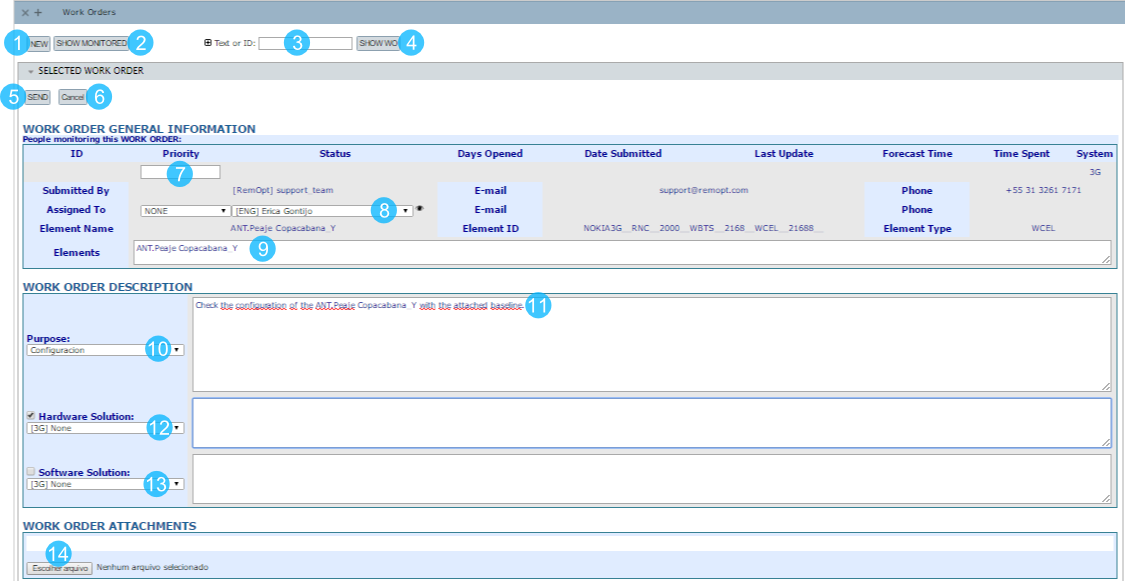
1 – Click to open a NEW work orders (WO).
2 – Click to monitor the WO that you are involved
3 – Type the number of the WO or some part of the WO text.
4 – Click to SHOW some WO.
5 – Click to SEND the WO.
6 – Click to CANCEL the WO.
7 – Set the priority.
8 – Insert some people to follow the WO.
9 – Click in the elements in the treeview to relate to the WO, that they will be shown in this field.
10 – Select the purpose of the WO.
11 – Describe your ticket as detailed as possible.
12 – Choose some hardware solution.
13 – Choose some software solution.
14 – Attach one or more files.