NEWS
OVERVIEW
This function is used to report a warning, new functionalities or any other information related to the project to all users.
HOW TO USE
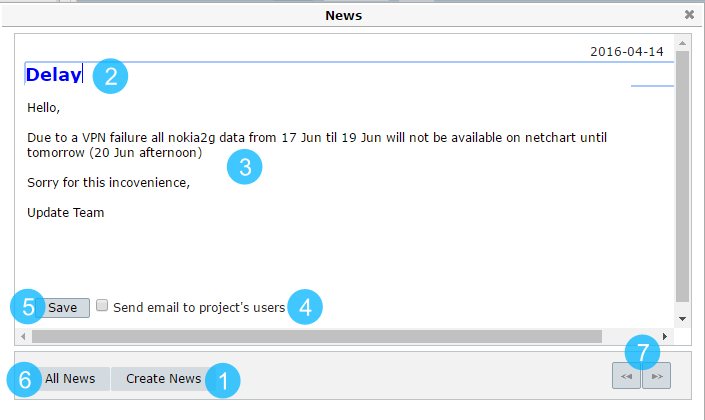
1 – Click to create a News.
2 – Change the title of the News.
3 – Type the message of the News.
4 – Click it if you want to send an email to all project users communicating about the News.
5 – Click to Save the News.
6 – Click to see All News.
7 – See the next or previous News.
USE CASES
This function is usually used to update the staff or to report missing data. It can also be used in order to communicate some new functionality of the tool or change any function.
COMMON ERRORS
- Invalid characters.
Error: A potentially dangerous Request. Form value was detected from the client (message='<h2>Missing data on …’).