PARAMETERS CHANGE HISTORY
OVERVIEW
This function is used to find parameters that had their values modified during a defined period. Its operation is similar to Parameters Compare. Here, it is used the option Compare Each Day, and, basically, the difference is the output mode. While in the Parameters Compare it is generated a file to download the results, in the Change History option the results are shown directly on the NetChart screen.
NOTE: The configuration of all parameters in NetChart is updated once a day, usually in the morning. So, the done parameter changes in the current day only can be seen in NetChart in the next update.
HOW TO USE
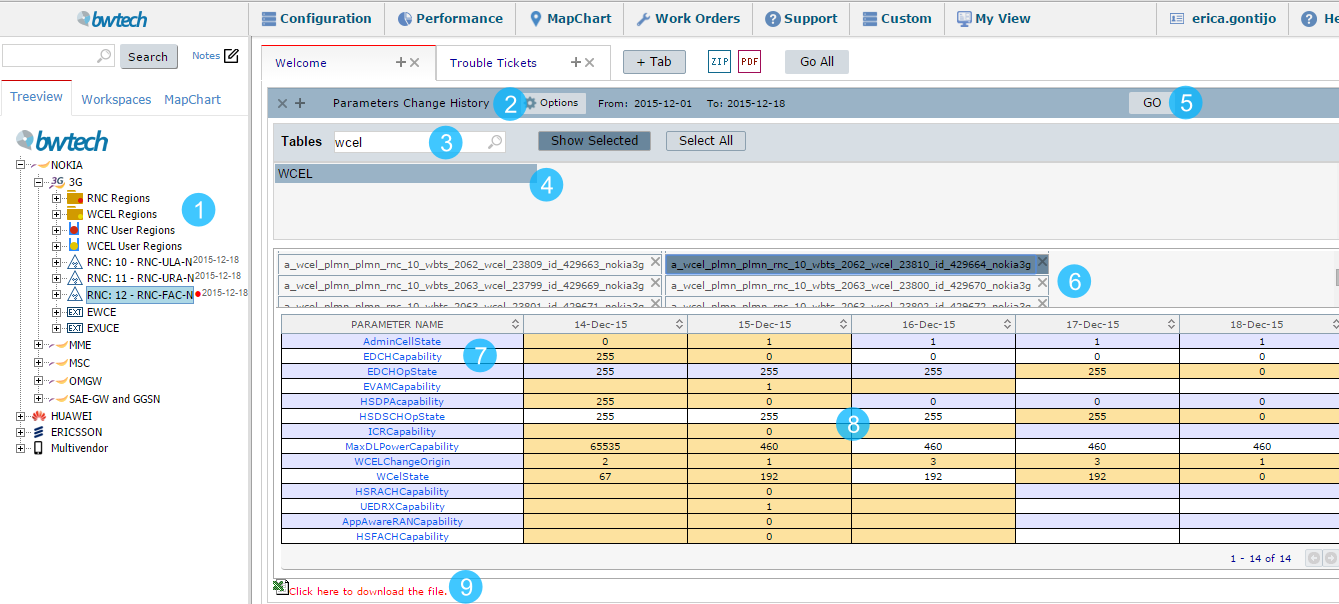
1 – Select the element to compare the parameters.
2 – In the Options button choose the date in which the parameters will be compared.
3 – Use the search to filter the table(s) that you are looking for.
4 – Select the table(s) whose parameters will be compared. It is possible to choose more than one table and the user can also click on the Select All button. To see the selected tables, click at Show Selected.
5 – Click on GO to download the parameters of the selected table(s).
6 – The changes come separated by elements in each tab. By selecting the element in the tab, all the parameters from the selected table that have changed in the period are shown in the table for each element.
7 – The name of each changed parameter. By clicking in this parameter name, its description will be showed.
8 – The day of the changes with its values. The values highlighted in yellow are corresponding to the days that a change happened.
9 – Click to download the file and analyze the changes.
USE CASES
In the results table, you will find one line per modified parameter and two columns for each modification operation. Take a look at the image below:
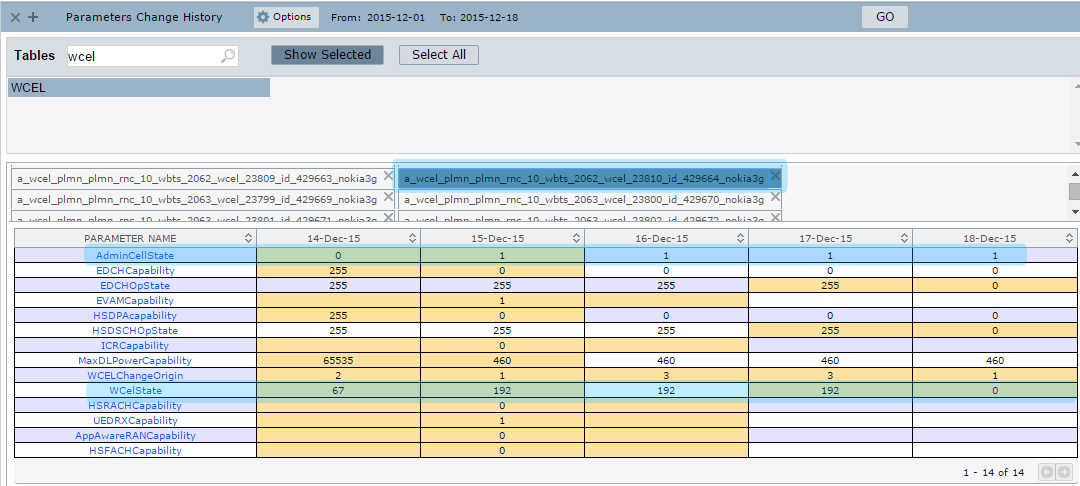
The tab with the WCEL with ID 23810 was selected to analyze the changes. Let’s observe the results in the highlighted parameters:
- AdminCellState: had its value changed from 0 to 1 between 14-Dec-15 and 15-Dec-15 and kept this value until the last day of selection.
- WcelSate: had its value changed from 67 to 192 between 14-Dec-15 and 15-Dec-15 and kept this value until 17-Dec-15, when it changed to 0, as can be observed on day 18-Dec-15.
COMMON ERRORS
- Looking for a table that belongs to a different level of elements.
NOTE: the available tables are displayed according to the selected element in the treeview.
- Looking for a table that belongs to other vendor/technology.